How to block distracting apps on iPhone for free using Shortcuts (no app blocker needed)

You can block distracting apps on your iPhone without paying for an app blocker, using two features already built into iOS: Focus modes and the Shortcuts app. The idea is simple. You create a Focus mode for when you want to concentrate, then set up an automation so that whenever you try to open a distracting app like Instagram or Facebook during that Focus, your phone instantly redirects you somewhere else instead. It is free, it takes about ten minutes to set up, and you can customize it to any apps you want. Here is exactly how to do it.
I set this up around my own focus app, FlowStack, because I use it to work on one task at a time with a timer. You can point it at any app you like, so if you use something else to focus, just swap the name in the steps below.
What you need
Everything here is built into your iPhone. You do not need to download or pay for anything:
The Shortcuts app (comes pre-installed on iOS)
Focus modes (in Settings, also built in)
Step by step
Here is the exact setup I am using myself. Everyone has different needs, so treat this as a starting point and adjust it to your own apps and habits. This guide is personalised for when you are supposed to be focusing on a task.
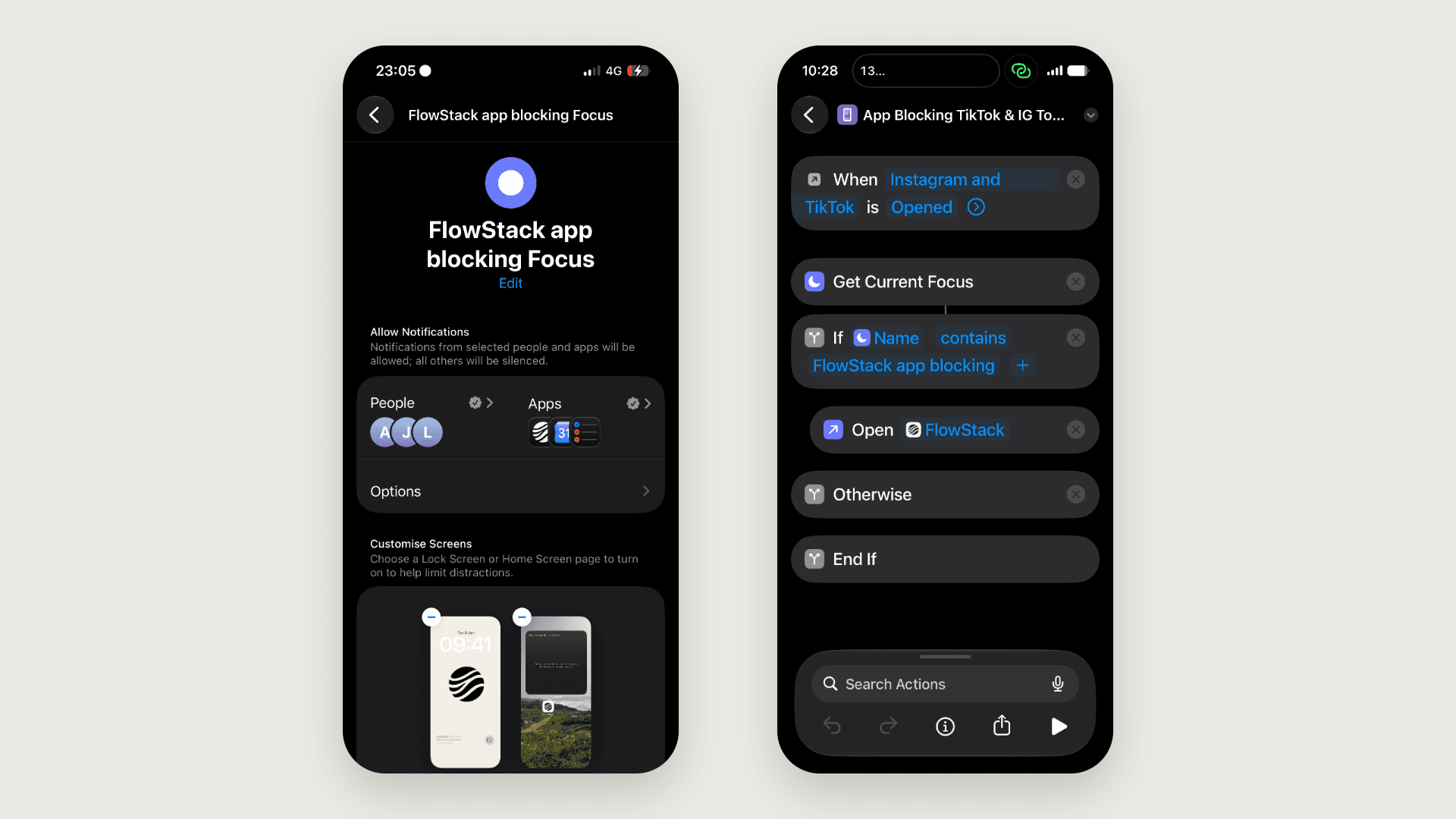
1. Create a dedicated Focus mode. Go to Settings, then Focus, and create a new Focus mode. I named mine "FlowStack app blocking" so it stays separate from Do Not Disturb and my other focus modes. Giving it its own name keeps things clean and makes the automation easier to set up.
2. Silence everything except your focus app. Inside that Focus mode, set it to allow notifications only from the one app you want open during focus time. For me that is FlowStack, other notifications turned off. The goal is that nothing pulls your attention while the Focus is on. The exception is to allow people that are on your 'VIP' list
3. Make a distraction-free home screen. Set the home screen that shows during this Focus to a page where only your focus app is visible. When the whole screen is empty except the one focus app you actually want, you are far less likely to reach for anything else out of habit.
4. Add this Shortcuts automation:
Shortcut for App Blocking TikTok & IG To Open FlowStack
Then, make the following changes:
1) Make it use whatever you named your focus mode to, mine was "FlowStack app blocking" so you need to change this if yours is named differently.
2) Select the apps you want blocked. In the automation above, TikTok and Instagram are used.
3) Choose the focus app you want to open. Mine is FlowStack which keeps you focused and reminded of the active or upcoming tasks.
What it does: when you try to open Instagram or TikTok while your FlowStack Focus is on, it reroutes you straight to FlowStack instead, so the distracting app never actually opens. The only way to get in is to take yourself out of the Focus mode on purpose. If your Focus mode has a different name, open the shortcut and change the name inside it to match yours.
Bonus tip
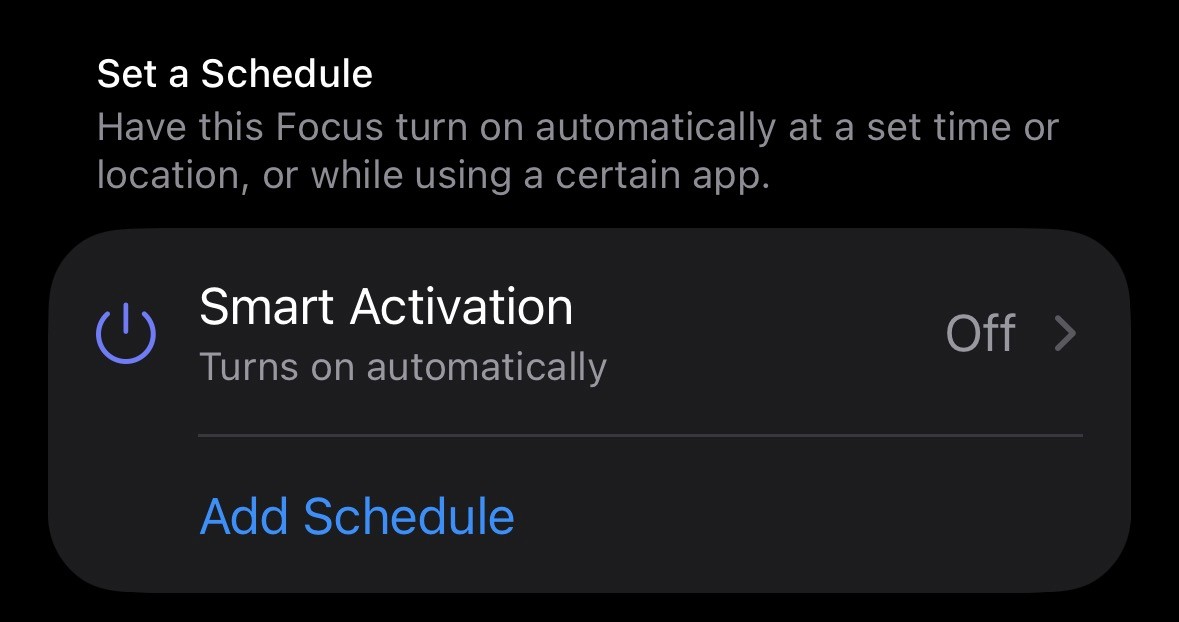
If you want this app blocking to trigger during a specific time of the day, or at a location, you can add this in the focus mode settings.
FAQ
Is there a free app blocker for iPhone? Yes. Instead of a paid app, you can combine two built-in iOS features, Focus modes and the Shortcuts app, to redirect distracting apps so they will not open during your focus time. It costs nothing and works on any iPhone with the Shortcuts app.
How do I use Shortcuts to block an app? Create an automation in the Shortcuts app that runs when the app you want to block opens, and have it run a shortcut that sends you to a different app instead if your current focus mode is a certain focus mode. During your Focus mode, tapping the blocked app will redirect you rather than open it.
Does this actually stop me from opening the app? It redirects you away from the app the moment you try to open it, so you cannot use it normally. You can still get in if you deliberately turn off your Focus mode, which is intentional. That small pause is usually enough to stop the mindless, automatic tap.
Can I use this with an app other than FlowStack? Yes. The method works with any app you want to focus on. Just name your Focus mode after it and change the app name inside the shortcut so it redirects to the app you actually use.
Which apps can I block this way? Any app you choose. Set up one automation per app you want to avoid, for example Instagram, Facebook, TikTok, or email. Each one redirects to your focus app while the Focus is on.