How to set up your own system for quickly writing a link or sentence you constantly have to write

A lot of what we type in a day is the same few things again. A website link, an app store link, an email address, a booking link, or the same first sentence in a reply.
Each of those usually means finding it somewhere, copying it and pasting it. Apple devices have a setting that removes that step: text replacements. You type a short code, and it turns into the full text.
How to set up text replacements on Mac
Open System Settings
Go to Keyboard
Click Text Replacements...
Click +
Under Replace, write the short code. Under With, write or paste the full text.
The next time you type the code, it gets replaced with the full text.
How to set up text replacements on iPhone
Open Settings
Go to General > Keyboard > Text Replacement
Tap +
Add the full text under Phrase and the code under Shortcut
If your Mac and iPhone use the same Apple ID, the list syncs between them, so you only need to set it up once.
Make it a system, not a list
Setting up one replacement is easy. The hard part is remembering what you called each one after you have twenty of them.
That's why it helps to use a naming system. Give each product, project or topic a short prefix, and then add what the text is.
For example, with fs as the prefix for FlowStack:
fsw → the FlowStack website
fsas → FlowStack on the App Store
fsgp → FlowStack on Google Play
Because they follow the same pattern, you don't have to remember each code separately. If you need the App Store link, you already know it starts with fs.
For things that don't belong to a group, a descriptive word also works, like calendlylink for a booking link or emailwork for a work email. They are longer, but easy to remember.
An example list
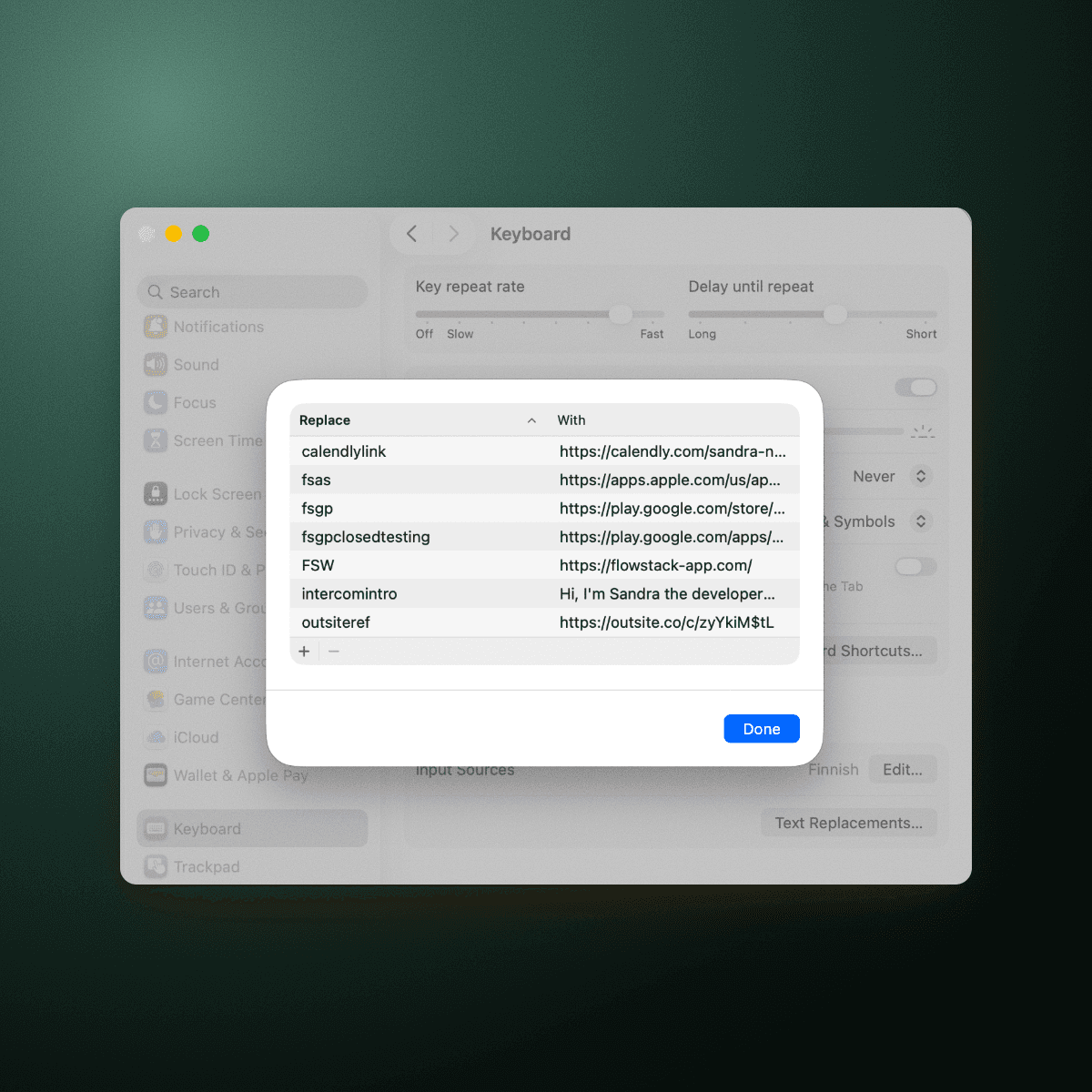
What to add to yours
Go through what you type or paste again and again. Good places to start:
Links you send to people
Email addresses
Sentences you start messages or replies with
Then make a code for each one, using your prefix system.
Staying focused on the bigger things too
Text replacements save you from small detours many times a day. The same idea works for your tasks: the fewer times you leave your work to look something up or figure out what's next, the more of your day goes to the work itself.
That's what FlowStack is built for. You add your tasks and estimate how long each one takes. When you start a focus session, the app puts you straight into the first task, so you don't have to decide what to do or go looking for your list.
While you work, the current task and its timer are shown as a Live Activity on your lock screen. So even if you pick up your phone for something else, you're reminded what you're supposed to be doing right now, and it's easier to get back to it instead of getting pulled into something else. When a task is done, the next one is ready to start.
Because you're not switching context or stopping to re-plan between tasks, it's easier to stay focused and get through your list faster, without distractions.